
 Join our Discord
FFD Prop Placer — Free Prop Placement Utility for FiveM
Place, Rotate, and Manage Props In-Game — No Coding Required!
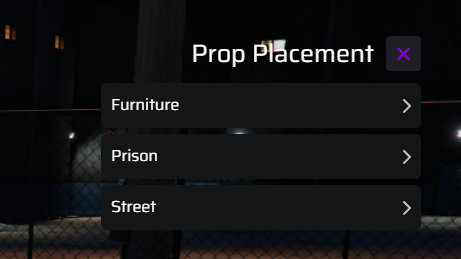
FFDPropPlacer gives admins, staff, and builders a quick and intuitive way to place, move, and delete world props directly in-game—without ever reloading the server or using clunky object spawners. Instantly decorate, create immersive events, or build custom scenes with live placement and full control.
Key Features
Easy In-Game Prop Placement:
Spawn any prop by name using a simple command or menu. Place and preview before confirming.Live Prop Rotation & Movement:
Use intuitive keybinds or UI sliders to rotate, move, or nudge props for perfect alignment.Instant Deletion:
Easily remove misplaced props with a single click or command.Admin/Staff Permissions:
Restrict usage to specific job roles, Discord roles, or admin groups (fully configurable).Persistent Placement:
Optionally save prop placements to a file or database for persistence after restarts (if enabled/configured).Undo/Redo Support:
Accidentally misplaced a prop? Use undo to instantly revert.Custom Prop Lists:
Preload a list of allowed props for quick selection, or allow manual prop name entry for advanced users.No Coding Required:
Works out of the box—just drop into your resources folder, start the script, and go.
Usage Instructions
/placeprop
Opens the placement tool or spawns a prop for manual placement.
Rotate/Nudge:
Use on-screen prompts or keybinds (configurable) to rotate or move the prop before finalizing.
Confirm or Cancel:
Confirm placement or cancel if you change your mind.
Remove Prop:
Use /manageprops while in the area of a prop to delete it instantly.
Who Is This For?
Server Admins/Staff: Quickly build scenes for events, RP, training, or custom server areas.
Event Organizers: Set up props for races, parties, heists, or custom events live, without restarts.
Builders/Developers: Rapid-prototype map ideas before converting them to MLOs or static maps.
Requirements
No dependencies on FFDBridge or any paid resources.
Works with any major framework (ESX, QB-Core, Standalone, etc.)
No special inventory or menu system required—all functionality is included.
Configuration
All keybinds, permissions, and allowed props can be easily edited in
config.lua.Supports role-based or identifier-based permissions for staff/admin-only features.
FAQ
Q: Does this work with every prop?
A: Any prop with a valid name/hash can be placed. For best results, use props listed in your server’s files.
Q: Can anyone use it?
A: Only if they have the configured permissions—by default, it’s admin/staff only.
Summary
FFDPropPlacer is the easiest way to manage in-game props on your FiveM server. No coding, no bridge, no extra setup—just pure, free, in-game building power for admins and staff.